Maester - From Zero to Hero
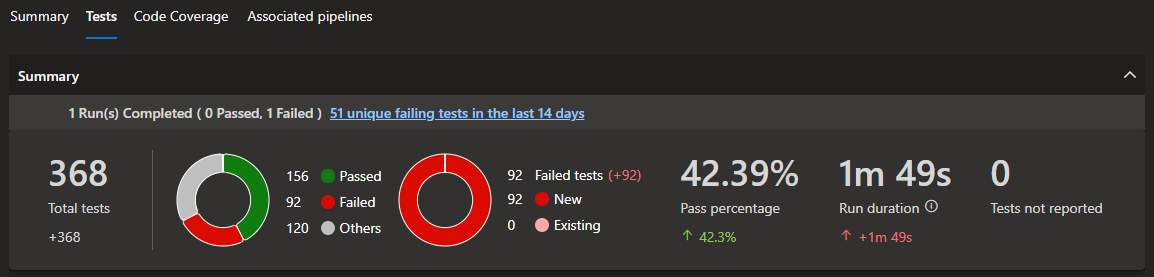
It's a pretty simple premise, you cannot improve what you don't appropriately measure. I've been coding websites in PHP (please don't judge me 😂) since highschool, cut my teeth on CSS and HTML in the MySpace era. I've had a healthy introduction to the software development lifecycle and more specifically a test driven development (TDD) methodology throughout countless roles and learnings. This isn't a brag, it's more providing some context around that little premise up above.
That same mindset, that TDD build to fail methodology has followed me across my Infrastructure and IAM Engineering roles and has absolutely found it's place in all. Every security journey starts with an uncomfortable number. Ours started at well... As above, not great. Intentionally though! A fresh(ish) Entra tenancy and the intent to build it from the ground up, measured and enhanced from consistent tests to fail, remediate, document and continually improve. You cannot improve what you don't appropriately measure, so this series; Maester - From Zero to Hero, takes that literally. It's our scoreboard, our Red to Green TDD.
What is Maester? Section titled What is Maester?
Most every man and his dog has at least heard of Maester by now, but on the off chance you've not, to quote the dudes themselves:
Maester is an open source PowerShell-based test automation framework designed to help you monitor and maintain the security configuration of your Microsoft 365 environment.
Maester is primarily built upon the Pester test and mock framework for PowerShell. I used to write my old PHP tests in Pest back when I hated myself, and if you've ever used that, or any of the bajillion other frameworks for languages the purpose is pretty much all the same, so if you've ever written a unit test, you already understand Maester. Every check passes or fails (or skips, or errors, but we consider these fails haha) exactly like Red to Green Test Driven Development, except the system being tested is your Microsoft 365 tenant. And I think that's pretty cool.
She's effectively running a whole bunch of community driven tests for a bunch of different Cyber related best-practice frameworks; CIS, CISA, SCuBA, EIDSCA, ORCA and a bunch of other alphabet salad acronyms. These tests run against relevant Graph (and other) endpoints within your tenant to generate a full pass/fail breakdown and, cherry on top, kindly generates a full human-readable HTML report that expands upon each failure to help provide remediation steps, just like the Microsoft Secure Score portals do. The best part is the facility to add your own custom tests should you wish if you've additional validation you want to ensure exists in your particular tenant.
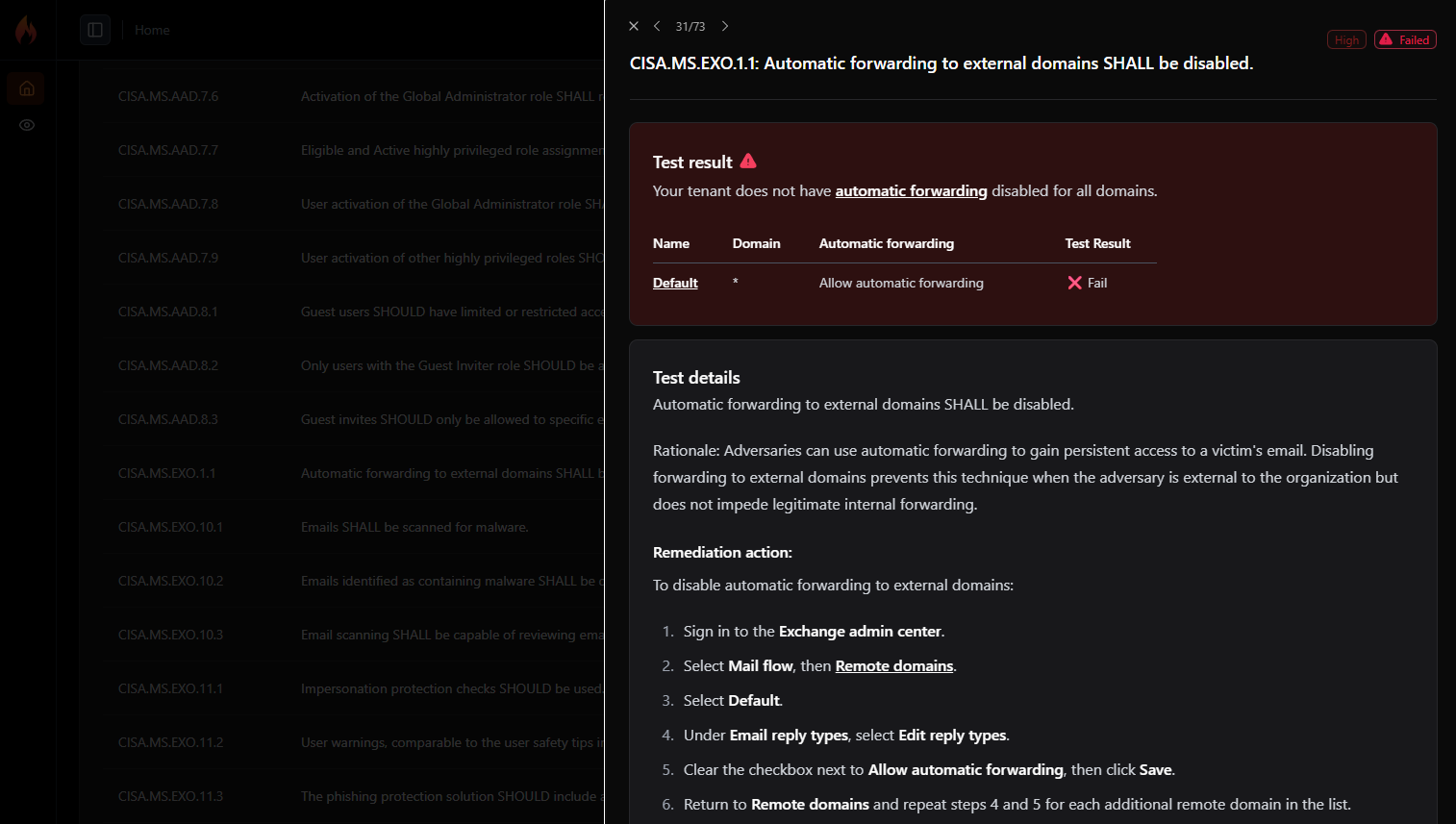
So with all of that in mind, Maester (along with the Microsoft Zero Trust Assessment, some EntraOps and the built-in security scores, that stuff comes later) was to be used on my fresh greenfield Microsoft 365 tenant, on a Microsoft Business Basic licence (so no fancy additional security measures available just yet) and see how far we could get using what we've got, with the intent to step up licensing to unlock additional features to pass more tests and push towards green. The full Zero to Hero journey.
The Lay of the Land Section titled The Lay of the Land
Immediately I decided to utilise the Azure DevOps and Azure WebApp monitoring method as my integration of choice, primarily because Bicep is my preferred IaC, Azure DevOps is where I choose to git as it's where most Enterprise tend to play, and I've an active WebApp in my Azure tenancy I wanted to piggy back off to access the html report via a hosted output rather than a downloaded artifact. Why? Because I wanted to see if I could for the most part. Plus, the fact Maester has that whole process fully fleshed out as a monitoring solution above (among many other options), why not. This isn't a direct copy and paste though, but it was an incredibly helpful guide for my specific integration choice.
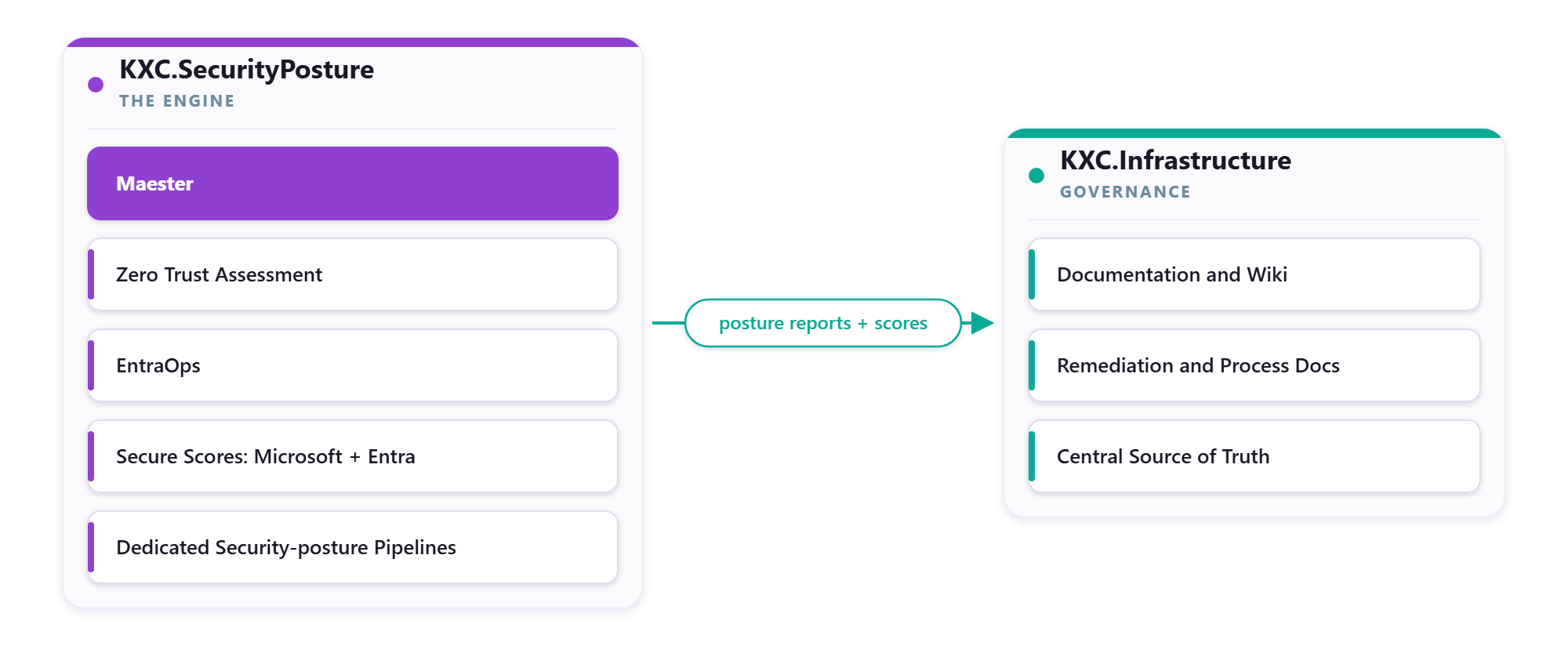
I'd already been working out of my KXC.Infrastructure Azure DevOps repo deploying some internal Azure Infrastructure and didn't want to pollute my Infrastructure pipeline with additional related but unrelated items, I made the decision to split out a clean KXC.SecurityPosture repo that would exclusively be the engine that drives the full bag of checks and tests (aka Maester, ZTA, EntraOps, MS Secure Scores) with its own dedicated pipelines reserved specifically for generating an appropriate security posture set of reports and scores.
That meant I could keep my documentation completely within the Infrastructure wiki, responsible for the governance, documentation and remediation documentation/process docs etc. A separation of concerns in terms of workload, but central source of truth in the parent repository.
Secretless by Design Section titled Secretless by Design
Given I wanted these tests running autonomously, I also needed to ensure the method in which the pipeline authenticated to my Entra ID tenancy was as secure as possible. I didn't want random secrets and/or certificates stored as pipeline variables (secure or not) as they're just an additional overhead to manage. The old error chasing in 12 months before you realise oh, the certificate expired and I forgot to set up any form of communications or rotations on this (ask me how I know)... The same with Personal Access Tokens (PATs), not a fan. Just another credential to monitor and manage and forget exists like a sneaky backdoor. So I opted to use Workload Identity Federation instead.
# Microsoft Graph
$graphToken = (Get-AzAccessToken -ResourceTypeName MSGraph -AsSecureString).Token
Connect-MgGraph -AccessToken $graphToken -NoWelcome

# Exchange Online (app-only; needs Exchange.ManageAsApp)
$exchangeToken = (Get-AzAccessToken -ResourceUrl 'https://outlook.office365.com' -AsSecureString).Token |
    ConvertFrom-SecureString -AsPlainText
Connect-ExchangeOnline -AccessToken $exchangeToken -AppId $AppId -Organization $OnMicrosoftDomain -ShowBanner:$false

# Security & Compliance
$ippsToken = (Get-AzAccessToken -ResourceUrl 'https://ps.compliance.protection.outlook.com' -AsSecureString).Token |
    ConvertFrom-SecureString -AsPlainText
Connect-IPPSSession -AccessToken $ippsToken -AppId $AppId -Organization $OnMicrosoftDomain -ShowBanner:$false

# Microsoft Teams (two tokens: Graph + the Teams admin resource)
$teamsGraphToken = (Get-AzAccessToken -ResourceUrl 'https://graph.microsoft.com' -AsSecureString).Token
$teamsAdminToken = (Get-AzAccessToken -ResourceUrl '48ac35b8-9aa8-4d74-927d-1f4a14a0b239' -AsSecureString).Token
Connect-MicrosoftTeams -AccessTokens @(
    ($teamsGraphToken | ConvertFrom-SecureString -AsPlainText),
    ($teamsAdminToken | ConvertFrom-SecureString -AsPlainText)
)

# Azure DevOps
$adoToken = (Get-AzAccessToken -ResourceUrl '499b84ac-1321-427f-aa17-267ca6975798' -AsSecureString).Token |
    ConvertFrom-SecureString -AsPlainText
Connect-ADOPS -Organization $AdoOrganization -OAuthToken $adoToken
That got us access from Azure DevOps out to the relevant Application Registration object as a federated credential in turn, giving the appropriate least privilege access permissions necessary to run not just our Maester tests, but also the others listed. So the permissions differ ever so slightly from the documented Maester list as the others require some additional permissions.
Least Privilege: The Permission Model Section titled Least Privilege: The Permission Model
The default to Global Reader (or worse... Global Administrator) just to give that blanket access with a promise to scope it down later was out of the question. Not happening, we're going least privilege out the gate. Reading your tenant posture doesn't require the keys to the kingdom. Every permission below was chosen to be the least we could get away with, read-only and granted per service plane (Graph, Exchange, Teams, Azure DevOps, Azure etc).
| Plane | How access is granted | The least-privilege choice |
|---|---|---|
| Microsoft Graph | 38 read-only application permissions (type Role), granted with admin consent |
Read-only scopes only. No write permission, and no Global Reader shortcut |
| Exchange Online | App-only via Exchange.ManageAsApp. The service principal is registered in Exchange Online and assigned two View-Only RBAC management roles: View-Only Configuration and View-Only Recipients |
Granular View-Only RBAC over Global Reader |
| Security and Compliance | Security Reader Entra directory role | The least directory role that unlocks both Security and Compliance PowerShell and the Exchange Online cmdlet context |
| Microsoft Teams | Teams Reader Entra directory role | Read-only Teams admin centre data, nothing more |
| Azure DevOps | Azure DevOps Administrator Entra directory role, plus Stakeholder access and Build Administrator membership | The one elevated role, justified and scoped to the tenant-policy tests it unlocks |
| Azure | Reader at the Tenant Root group, inherited to every child management group, with scoped Contributor on the posture resource group | Reader everywhere for assessment. Write only on the single resource group that holds deployments |
Now, if you're purely following the Maester guidance it'll be less than this. But as noted, this single Application Registration covers the audit permissions required for multiple different tools.
I did find the process a bit finnicky initially, the modern Exchange RBAC method was nice and easy, as were the typical Graph permissions. But a handful of the service plane specifics gave me trouble initially. The bulk of all Maester errors, as in the test errored, not failed, were due to an authentication issue of some kind. But a bunch of probing back and forth with old mate Claude Code helped narrow down what was failing and why and determine exactly what permission was missing and remediating it.
The Daily Scan Section titled The Daily Scan
After resolving all the permissions errors (documenting everything along the way because that's how we roll) and since we were pipelining this bad boy, the whole purpose was to set her up on a daily cron. 20:00 AEST every day (or at least everyday my computer is on, there's a reason for that...) my maester-daily.yml fires off across four (4) stages:
| # | Stage | Purpose | Failure behaviour |
|---|---|---|---|
| 1 | RunTests | Run the Maester suite, publish NUnit results and the HTML report, derive maester.json |
Test failures publish as warnings; the stage does not fail (failTaskOnFailedTests: false) |
| 2 | SecureScore | Fetch Microsoft Secure Score via the Graph v1.0 REST API | Runs even if RunTests failed (succeededOrFailed) |
| 3 | EntraSecureScore | Fetch the Entra Identity Secure Score via the Graph beta REST API | Runs even if RunTests failed (succeededOrFailed) |
| 4 | Publish | Deploy the HTML report to the Static Web App (conditional) and write the three posture scores to the website database | Runs even if earlier stages failed (succeededOrFailed); DB write gated on dbWriteEnabled |
# maester-daily.yml (excerpt): daily Maester posture scan
trigger: none
pr: none

schedules:
  - cron: '0 10 * * *'                 # daily 20:00 AEST (10:00 UTC)
    displayName: 'Daily Maester run (20:00 AEST)'
    branches:
      include: [main]
    always: true

variables:
  serviceConnection: sc-kxc-secpos-cd  # Workload Identity Federation, no secrets
  maesterVersion: '2.1.0'              # pinned; version bumps are deliberate
  dbWriteEnabled: 'true'               # push posture scores to the website database
  appId: '<app-registration-id>'       # sanitised
  websiteAppName: '<web-app-name>'     # sanitised
  tenantDomain: korthcore.com
  adoOrganization: korthcore
  onMicrosoftDomain: korthcore.onmicrosoft.com

pool:
  name: kxc-ado-pool-linux             # self-hosted Linux agent

stages:
  - stage: RunTests
    displayName: Maester security tests
    jobs:
      - job: ExecuteMaester
        steps:
          - checkout: self
          - task: AzurePowerShell@5
            displayName: Run Maester tests
            inputs:
              azureSubscription: $(serviceConnection)   # WIF auth, no PAT
              pwsh: true
              ScriptType: FilePath
              ScriptPath: maester/scripts/Invoke-MaesterTests.ps1
      - job: ExecuteMaester
        steps:
          - checkout: self
          - task: AzurePowerShell@5
            displayName: Run Maester tests
            inputs:
              azureSubscription: $(serviceConnection)   # WIF auth, no PAT
              pwsh: true
              ScriptType: FilePath
              ScriptPath: maester/scripts/Invoke-MaesterTests.ps1
              ScriptArguments: >-
                -MaesterVersion '$(maesterVersion)' -AppId '$(appId)'
                -TenantDomain '$(tenantDomain)' -AdoOrganization '$(adoOrganization)'
                -OnMicrosoftDomain '$(onMicrosoftDomain)'
          - task: PublishTestResults@2
            condition: always()
            inputs:
              testResultsFormat: NUnit
              testResultsFiles: '**/test-results.xml'
              failTaskOnFailedTests: false   # a red control is a warning not a broken build

  # Stages 2 to 4 follow the same shape:
  #   SecureScore       Get-SecureScore.ps1 (Graph v1.0),  condition: succeededOrFailed()
  #   EntraSecureScore  Get-EntraSecureScore.ps1 (beta),   condition: succeededOrFailed()
  #   Publish           deploy HTML report to the SWA, write posture scores to the website DB
I'm a fan of this setup as I've intentionally combined the Microsoft Secure Score and Entra Identity Secure Score as stages within this pipeline. As I'm basically pulling a Thanos and collecting security posture data like Infinity Stones across the galaxy tenancy, it made sense to bundle this security posture data in the same 24h scheduled pipeline as the Maester run.
Oh, and:
or at least everyday my computer is on, there's a reason for that...
The reason wasn't that exciting. I absolutely burnt through my free 1800 monthly Azure DevOps pipelines agents free minutes or whatever the amount is in like, a week. Too many failed pipeline runs back to back and spread across at least 5 repos ate those minutes up. So rather than either pay for an agent slot or wait it out, I opted instead to just host my own free agent in a docker container, within WSL (Windows Subsystem for Linux) on my PC because hey, at least it's free? It is only temporary though, but still fully documented!
Two Scores, Two APIs Section titled Two Scores, Two APIs
Look, it's not Maester related, but as it's included in my config I reckon it's worth including here for some adjacent security posture data alongside Maester to do with what you please. For me? That's putting all that info into a database and turning it into pretty graphs and datasets on the website (TBA).
| Property | Microsoft Secure Score | Entra Identity Secure Score |
|---|---|---|
| Scope | Entire M365 tenant (identity, devices, apps, data) | Entra ID configuration only |
| API | GET /security/secureScores (v1.0) |
GET /directory/recommendations/tenantSecureScores (beta) |
| Permission | SecurityEvents.Read.All |
DirectoryRecommendations.Read.All |
| Module | None (direct REST) | None (direct REST) |
| Pipeline Stage | SecureScore | EntraSecureScore |
| Artifact | SecureScore/secure-score.json |
EntraSecureScore/entra-secure-score.json |
Two lenses on the same tenant, straight from the Graph API.
Closing the Loop Section titled Closing the Loop
A score nobody sees changes nothing, Maester, legends that they are provide numerous methods for both Monitoring your tenant, which includes options for viewing the html report etc. But also for Alerting which is slick. Eventually I'll get around to configuring the Teams Alert, love me some Teams notifications.
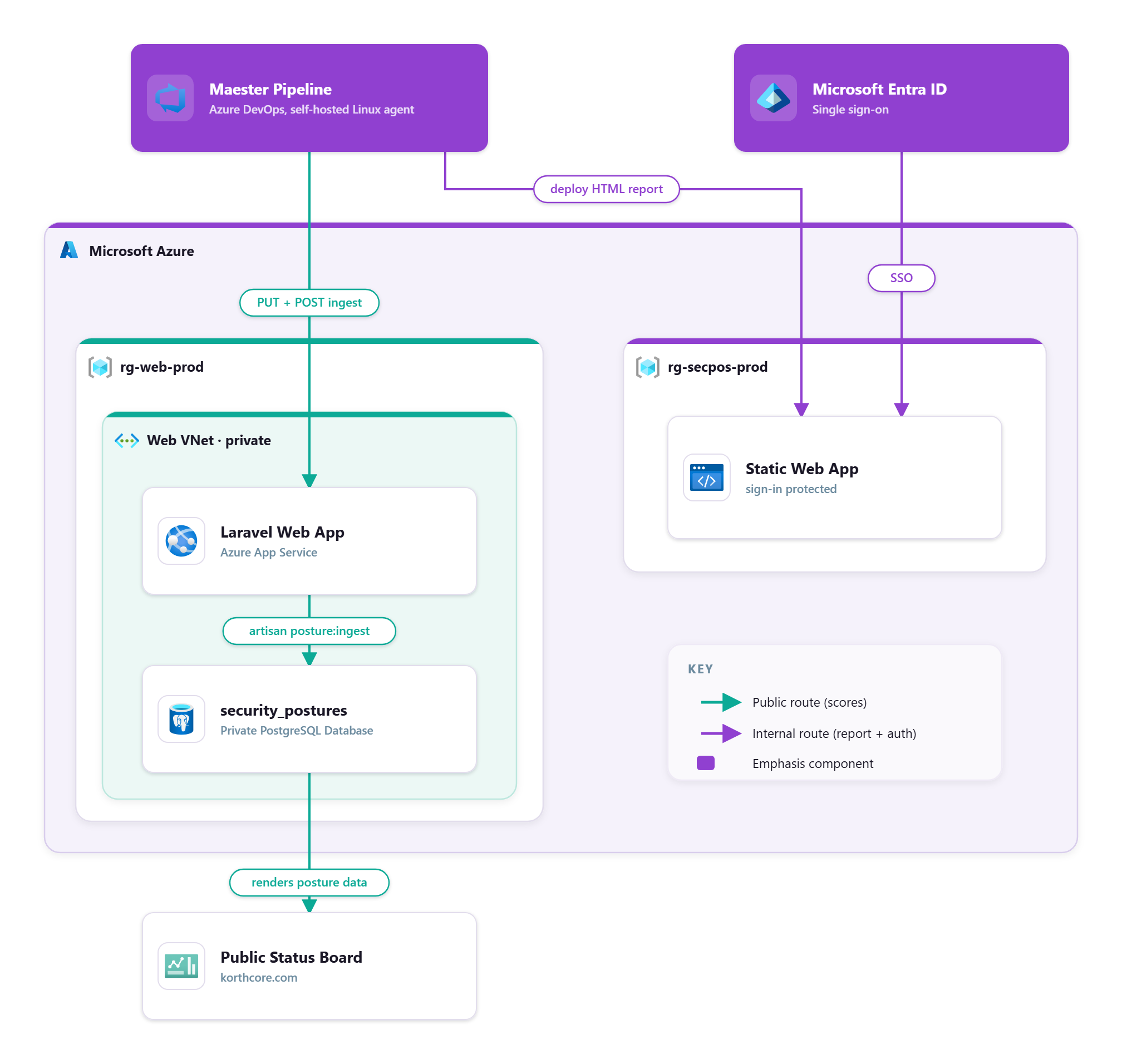
So, because I obviously enjoy keeping things simple and not over-engineering solutions for the hell of it, the maester-daily.yml pipeline closes the loop for us twice as part of the Publish stage broken down into effectively two categories; the html report sent to an internal Entra ID SSO protected Static Web App (SWA), and the jsonified data also being pushed into my korthcore.com database to be published on the front facing website. Yes, those entra secure score and maester compliance values in the system status silliness on the front page of korthcore.com are live(ish) security posture data values.
# No DB credentials: a management bearer token, a Kudu VFS upload, then an authenticated POST.
$token   = az account get-access-token --resource 'https://management.core.windows.net/' --query accessToken -o tsv
$scmBase = "https://$WebAppName.scm.azurewebsites.net"   # Kudu (SCM) plane
$appBase = "https://$WebAppName.azurewebsites.net"        # the app itself

# 1. PUT the JSON payload onto the App Service via the Kudu VFS API
$vfsUrl = "$scmBase/api/vfs/$inboxVfsPath/$source.json"
Invoke-WebRequest -Uri $vfsUrl -Method Put -InFile $payloadFile `
    -ContentType 'application/octet-stream' `
    -Headers @{ Authorization = "Bearer $token"; 'If-Match' = '*' } | Out-Null

# 2. POST to the app's authenticated ingest endpoint; it runs `php artisan posture:ingest` in-container
$response = Invoke-RestMethod -Uri "$appBase/api/internal/posture-ingest" -Method Post `
    -Headers @{ Authorization = "Bearer $token"; "Content-Type" = "application/json" } `
    -Body (@{ source = $source } | ConvertTo-Json -Compress)

# 3. Success only if the app echoes the agreed marker
if (($response.output ?? '').Trim() -notmatch 'POSTURE_INGEST_OK') {
    throw "Ingest for '$source' did not return POSTURE_INGEST_OK."
}
Where We Are, and What is Next Section titled Where We Are, and What is Next
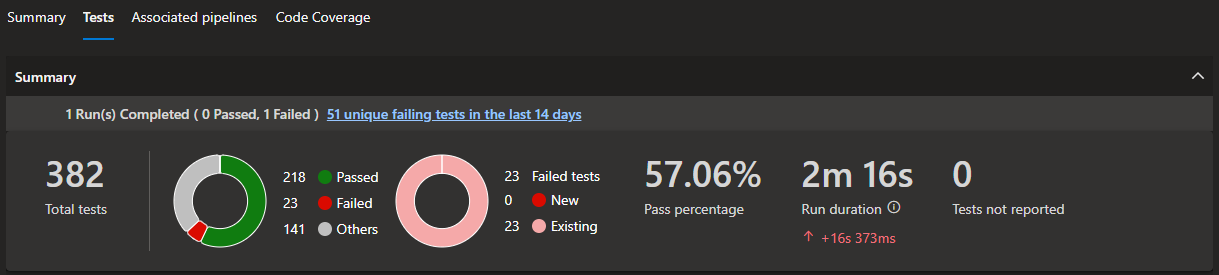
So that set up our Maester foundation. A solution that'll keep running and keep giving me updated information on my tenant daily to plan and remediate failings as they are investigated. The best part, that 57% Maester compliance score (if you're reading this in the future, this value may have changed, point still remains) isn't even close to our original score. It wasn't pretty at all seeing that much red, but as we said right back at the start of this post:
You cannot improve what you don't appropriately measure.
That's a pretty good indicator that we are doing a lot of appropriate measuring and a lot of planned improvements. Sure, a whole bunch at this stage are pure failures due to being locked behind a licensing requirement (remember, we're sitting on a Microsoft Business Basic licence at this point) and our compliance score is intentionally calculated as a Passing / Total rather than excluding skips. That gives us a more true value rather than an inflated value like the current Entra Identity Secure Score (this one is a 24 / 24, thus 100% as it doesn't show future values until licence gating is unlocked) but that's good as it gives us an easily measurable remediation path. We validate but ignore/accept the licence skipped tests and then we plan out the next post in this Maester - From Zero to Hero series by remediating everything we can with a Microsoft Business Basic licence only!
Post Series :: Maester - From Zero to Hero
A Korthcore journey from a fresh(ish) Microsoft tenant to a hardened, high-scoring security posture using Maester (and others) as the TDD push to enterprise level security no matter the size. Documented in full (including remediation automations) stepping through the licence gates one at a time.
| # | Post |
|---|---|
| Part 1 | Maester - From Zero to Hero // you are here |
| Do it once, do it right. Wiring Maester as a Red to Green Test Driven Development experiment with secure foundations on a greenfield tenant. | |
| Part 2 | Maxing Out Business Basic |
| We've got our baseline, Microsoft Business Basic licensing. The idea being to squeeze everything this baseline licensing allows out of our Maester score, remediating the tenant control by control, and documenting the lot. | |