Maxing Out Business Basic
- Measuring Everything, Not Just Pass / Fail
- What Done Looks Like on Business Basic
- Remediating the Tenant: Find, Ticket, Document, Fix, Validate
- Backlog of Doom
- The Remediation Method
- Validate Before You Enable
- Fighting a Secure Default (AZDO.1010)
- My First Public Pull Request
- Wiring the Score to the Website
- The Pipeline: Scan to JSON to Endpoint to Database
- The Security Posture Data Shape
- Where it's Visible
- No Suppression
- Maxed out on Business Basic

We keep coming back to that original tenet, we cannot improve what we cannot measure. Maester comes out swinging to give us that starting number. The quick and dirty measurement on where we stand. And look, as we've seen it wasn't great. That 42% figure was our first successful run and that alone took a handful of failed attempts due to my (poor) permissions planning. I read the docs, and I missed some stuff anyway! Curse you Microsoft Exchange!
I knew setting this up I wanted to target everything I could across my setup. I wanted that backlog to cover everything:
- Graph
- Exchange Online
- Security and Compliance
- Microsoft Teams
- Microsoft DevOps
As in post one, all of these utilising a Workload Identity Federation token per plane.
But some of these initial scans weren't just a test failure for poor security posture (we have enough of those) but genuine errors we needed to resolve. A silly little DNS issue on my self-hosted Linux pipeline agent caused one. A fun little bug we found in the Maester check, the SPF resolver rejecting a null server caused two (2) errors. Some session fragility around Security and Compliance connection sometimes loading no module. All attempted to resolve and report (where appropriate) to clear our run.
That finally netted us that first successful run. 156 passed, 90 failed, 6 errored, 116 skipped, 44 not run of 412. That's our little heatmap up the top of this post. And that wasn't necessarily a bad thing! That's our backlog! Now we've got a solid list of tests we know to work through attempting to resolve. Max out our Microsoft Business Basic licence and get our security posture as strong as it can with no extra bells and whistles (I'm looking at you PIM! Soon my friend, soon.
Forewarned, this is gon' be a long one, grab a cuppa before you read on.
Measuring Everything, Not Just Pass / Fail Section titled Measuring Everything, Not Just Pass / Fail
| Outcome | What it Means | Run #514 |
|---|---|---|
| Passed | Ran, and the tenant meets the control | 156 |
| Failed | Ran, and the tenant does not meet it, a fixable gap | 90 |
| Errored | Could not complete, usually a licence-gated endpoint that errors instead of skipping cleanly | 6 |
| Skipped | Ran and does not apply here, no agents, cloud-only, method disabled | 116 |
| Not run | Not executed, excluded or not yet in coverage | 44 |
Similar to deciding early on to scan every surface imaginable, I also wanted to treat the results as a whole as well. Not just looking at the Pass / Fail ratio, that here would be what? 63%? Still not fantastic, but not truthful in my mind. I wanted the whole picture and to see what I could do to make it better, not just ny enacting the controls to pass a fail.
That shaped the whole process of remediation planning really.
- A fail you can fix, the Maester tells you what failed and how to fix it (most of the time).
- An error? Well that tells me something went wrong, my expectations is zero (0) errors in my setup.
- A skip? Of which there were many, could be legitimate (licence based) or some could be a bit of a cop out, I was gonna check them all regardless.
- And not run / excluded was a red flag for me to investigate as well. Why not? Whats missing?
What Done Looks Like on Business Basic Section titled What Done Looks Like on Business Basic
Look. There's genuinely a lot you can actually do on a Business Basic licence. Sure, it's not explicitly hardcore enterprise level quality security enhancements, but its something. And a lot of it is super simple to implement that there's genuinely no good reason not to. For Korthcore, this is just the starting point, the entry level.
That set me a little foundation to run against. A set of three (3) rules I wanted to set myself when digging through the Maester results (I love me a rule of three, cheers Zelda!).
- Fix everything the licence allows.
- Don't hide what can't be fixed.
- Keep the whole surface visible.
Pretty simple right? Same mantra I'll take to each licence step up the chain. If the licence allows a remediation item to be fixed? Fix it, make it green. We find something we can't fix? We don't enforce a -SkippedBecause on it, it stays a fail because its genuinely a fail. Keep that whole surface visible as the true security posture, at least through the Maester lens.
Remediating the Tenant: Find, Ticket, Document, Fix, Validate Section titled Remediating the Tenant: Find, Ticket, Document, Fix, Validate
So we've got our backlog, that's our remediation plan! Or at least the semblance of one to determine what's legit and what needs uplifting. A quick analysis told me we should be able to remediate at least 73 of the 96 fails with our Business Basic Licensing, a solid start!
Using Jira I set up a Maester :: Remediation Epic on my Infrastructure board and started generating tasks to address within, grouped by root cause rather than individual as often a single remediation fix would resolve multiple failures. Then it was time to jump in and fix these bad boys, following a similar process for each one; find the failure, generate a trackable work item (ticket), document the remediation and its impact, fix the thing, validate it was resolved.
Backlog of Doom Section titled Backlog of Doom
As noted above, generated a bunch of Jira work items to start tracking what I needed to do, mapped out as below:
| Area | Ticket(s) | What it Covered |
|---|---|---|
| Exchange Online Protection | INF-242 | Anti-malware, anti-phishing, anti-spam baselines, EOP presets, external auto-forward block, external-sender tagging |
| Exchange org config | INF-244 | Calendar sharing, external-recipient MailTips, direct-send, add-in install, OWA storage providers, unified audit log |
| Email authentication DNS | INF-243 | SPF, DKIM, DMARC records |
| Entra consent and authz | INF-245 | Admin SSPR, user app-consent restriction, M365 group settings, management-group write |
| Entra auth methods | INF-246 | Auth-methods general settings and FIDO2 key restrictions |
| Entra device hygiene | INF-249 | Device-registration policy (MT.1070/1090/1091) |
| Privileged admin account | INF-258 | Dedicated cloud-only no-mailbox admin; strip permanent Global Admin off the mailbox account |
| Azure DevOps hardening | INF-250, INF-255 | 15 AZDO controls including the audit sink; dedicated org-owner account |
| Teams | INF-247, INF-260 | App-permission policy, consumer federation, lobby bypass, third-party storage |
| SharePoint | INF-248 | External sharing restricted to approved domains |
| Coverage and engine | INF-241, INF-252 | Trim blanket exclusions; resolve Maester execution errors |
The Remediation Method Section titled The Remediation Method
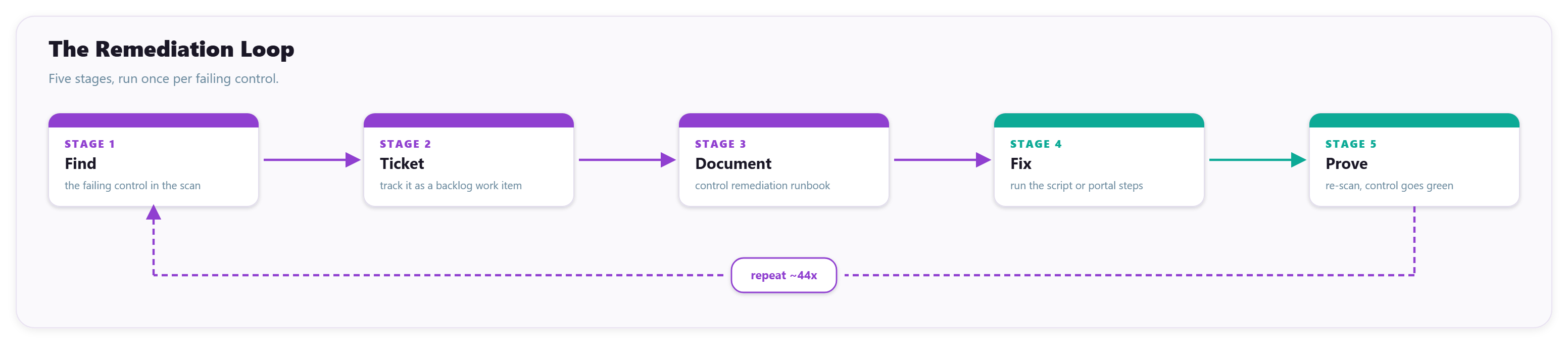
Implementation of remediation items was pretty straightforward and I wanted to ensure I captured as much of the process as I could, so no ad-hoc fixes. The loop as outlined previously helped enforce this at this layer. With our backlog of work items to step through, it was time to determine the structure and quality of documentation I wanted. Not just "Oh I've added a comment to the ticket." but a proper remediation level document that outlines:
- The control
- Why it matters
- The decision
- What the change will affect
- Any licensing required
- The remediation steps (both scripted if applicable and portal steps)
- The test coverage
- How it's verified
And this was very much intentional, I wanted to ensure the quality of each of these was up to my standards and could easily be used as remediation docs to provide to clients, already outlining the resolutions and blast radius of the change so an informed decision can be made. Maester, by itself, gives you these steps in its HTML report which is fantastic, I just decided to expand on that with a bit more grunt.
The vast majority of these remediation tasks are easily scriptable. They're just specific config settings that can be updated via PowerShell (relevant Modules) and/or Graph API endpoints. This let us generate a bunch of quick and dirty scripts for each! Now I say quick and dirty, but they're properly fleshed out, including -WhatIf validation where appropriate. And for any controls that couldn't be scripted? Each document held explicit Portal remediation steps as well if click-ops is more preferable for visibility. Below is an example snippet of one of the scripts used to remediate MT.1062 within the tenancy, this is a snippet not the full thing but it gives you an idea on each of these being created.
#Requires -Version 7.4

# Remediates Maester MT.1062 (Ensure Direct Send is rejected).
# Idempotent, ShouldProcess-gated, verifies the change stuck.
# Expects an authenticated Exchange Online session (Connect-ExchangeOnline).

[CmdletBinding(SupportsShouldProcess)]
param()

$ErrorActionPreference = 'Stop'
$InformationPreference = 'Continue'

try {
    if (-not (Get-Command -Name 'Set-OrganizationConfig' -ErrorAction SilentlyContinue)) {
        throw 'Exchange Online cmdlets are not available. Run Connect-ExchangeOnline first.'
    }

    $current = Get-OrganizationConfig

    if ($current.RejectDirectSend) {
        Write-Information 'Direct Send is already rejected (RejectDirectSend is True). No change.'
    }
    else {
        Write-Information 'Setting RejectDirectSend to true (was False).'
        if ($PSCmdlet.ShouldProcess('Organisation configuration', 'Set RejectDirectSend to true')) {
            Set-OrganizationConfig -RejectDirectSend $true

            $updated = Get-OrganizationConfig
            if (-not $updated.RejectDirectSend) {
                throw "Failed to set RejectDirectSend; tenant reads '$($updated.RejectDirectSend)'."
            }
        }
    }

    Write-Information 'Direct Send is rejected for the organisation.'
}
catch {
    Write-Error -ErrorRecord $_
    exit 1
}
Then... Apply 'em. A handful of tests were intentionally left to fail if I chose not to remediate just yet (not ready, future plans to resolve within a proper structure) but for the most part, I just validated what would change when implementing and decide to proceed or not. Validation was easy, run the explicit failing Maester tests again individually, verify they now pass green and then wait for the next full Maester pipeline run. And scaling? Easy. Ran this same loop about 44 times.
Validate Before You Enable Section titled Validate Before You Enable
Now this, this was *chefs-kiss* an absolute quality failure. It was entirely my own doing and made worse by the fact I have spent the last couple months quite literally living in this exact configuration, so I have absolutely no excuse. It was funny though.
I had already configured my MFA methods within Entra ID to include FIDO2 authentication methods, I have a bunch of YubiKeys so it was an easy immediate yes to turn on and enforce as mandatory, I just hadn't yet configured a dedicated AAGUID allow-list, which is why a specific check was failing (EIDSCA.AF04). I'd also already configured passkey authentication via my Microsoft Authenticator so I had multiple avenues covered if I ever lost my physical keys for whatever reason. The actual list of AAGUIDs was easy to decide, I'd already done the research on this for the current project I was working on, so easy to compile what I wanted to enforce.
| Product Name | FW | FIDO2 AAGUID | FIDO Certification Level |
|---|---|---|---|
| YubiKey 5 NFC, 5C NFC | 5.7 | a25342c0-3cdc-4414-8e46-f4807fca511c |
Level 2 |
| YubiKey 5 NFC, 5C NFC | 5.7 | d7781e5d-e353-46aa-afe2-3ca49f13332a |
Level 2 |
| YubiKey 5 NFC - Enhanced PIN, 5C NFC - Enhanced PIN | 5.7 | 662ef48a-95e2-4aaa-a6c1-5b9c40375824 |
Level 2 |
| YubiKey 5 NFC, 5C NFC, 5 NFC CSPN, 5C NFC CSPN | 5.2, 5.4 | 2fc0579f-8113-47ea-b116-bb5a8db9202a |
Level 1 |
| YubiKey 5 Nano, 5C Nano, 5C | 5.7 | 19083c3d-8383-4b18-bc03-8f1c9ab2fd1b |
Level 2 |
| YubiKey 5 Nano, 5C Nano, 5C | 5.7 | ff4dac45-ede8-4ec2-aced-cf66103f4335 |
Level 2 |
| YubiKey 5 NFC FIPS, 5C NFC FIPS | 5.4 | c1f9a0bc-1dd2-404a-b27f-8e29047a43fd |
Level 2 |
| YubiKey 5 Nano FIPS, 5C Nano FIPS, 5C FIPS | 5.4 | 73bb0cd4-e502-49b8-9c6f-b59445bf720b |
Level 2 |
| YubiKey 5 NFC FIPS, 5C NFC FIPS | 5.7 | fcc0118f-cd45-435b-8da1-9782b2da0715 |
Level 2 |
| YubiKey 5 Nano FIPS, 5C Nano FIPS, 5C FIPS | 5.7 | 57f7de54-c807-4eab-b1c6-1c9be7984e92 |
Level 2 |
| YubiKey Bio - FIDO Edition | 5.5, 5.6 | d8522d9f-575b-4866-88a9-ba99fa02f35b |
Level 1 |
| YubiKey Bio - FIDO Edition | 5.7 | dd86a2da-86a0-4cbe-b462-4bd31f57bc6f |
Level 2 |
| YubiKey Bio - FIDO Edition | 5.7 | 7409272d-1ff9-4e10-9fc9-ac0019c124fd |
Level 2 |
| Microsoft Authenticator (iOS) | N/A | 90a3ccdf-635c-4729-a248-9b709135078f |
N/A |
| Microsoft Authenticator (Android) | N/A | de1e552d-db1d-4423-a619-566b625cdc84 |
N/A |
Had all the confidence in the world, was in a good flow state and ticking off a whole bunch of remediations throughout the evening. Landed on this and got lazy, thought yeah nah not an issue in the slightest. Pushed the fix, added my 13 YubiKey AAGUIDs to the allow list and signed out of all portals to do a test. Problem with that was, I didn't have my physical keys handy at all. But no big deal, I've got my authenticator passkey precisely for this reason! Big problem there... I didn't add the Microsoft Authenticator iOS and Android AAGUIDs to my allow list. I'd most definitely just locked myself out... At least until I had my physical keys back in hand.
But is an exact scenario you read about when configuring the enhanced security features like this or Conditional Access Policies, a slight misconfiguration can absolutely lock you out. I was being cocky and nearly did that to myself, I lucked out by 1) Obviously having physical keys to use, it was just an inconvenience and 2) Because I'm on Business Basic with no Conditional Access Policies enforcing reauthentication, my existing Graph sessions were still active, so I just added the two AAGUIDs I needed. Absolutely reinforced me validating exactly my intent before enabling. The fail was on me 100%. But, well, it did ensure those failing Maester tests were now passing! So technically a win.
Fighting a Secure Default (AZDO.1010) Section titled Fighting a Secure Default (AZDO.1010)
This was a fun one! This bad boy wanted audit streaming enabled for Azure DevOps which, is entirely justified. Configure to stream those logs to a Log Analytics Workspace for well, log analytics. And because I had already been playing around with my Infrastructure proper, I'd already set up a Log Analytics Workspace that was ingesting all my Entra ID sign-in and audit data and one I'd configured to be hardened with no local auth as a Zero Trust control. Problem with that is, at least from what I could find, is that Azure DevOps audit streaming authenticates only with a workspace shared key over the legacy Data Collector API, which has no managed identity option. Effectively incompatible with how I'd configured my Infrastructure Log Analytics Workspace.
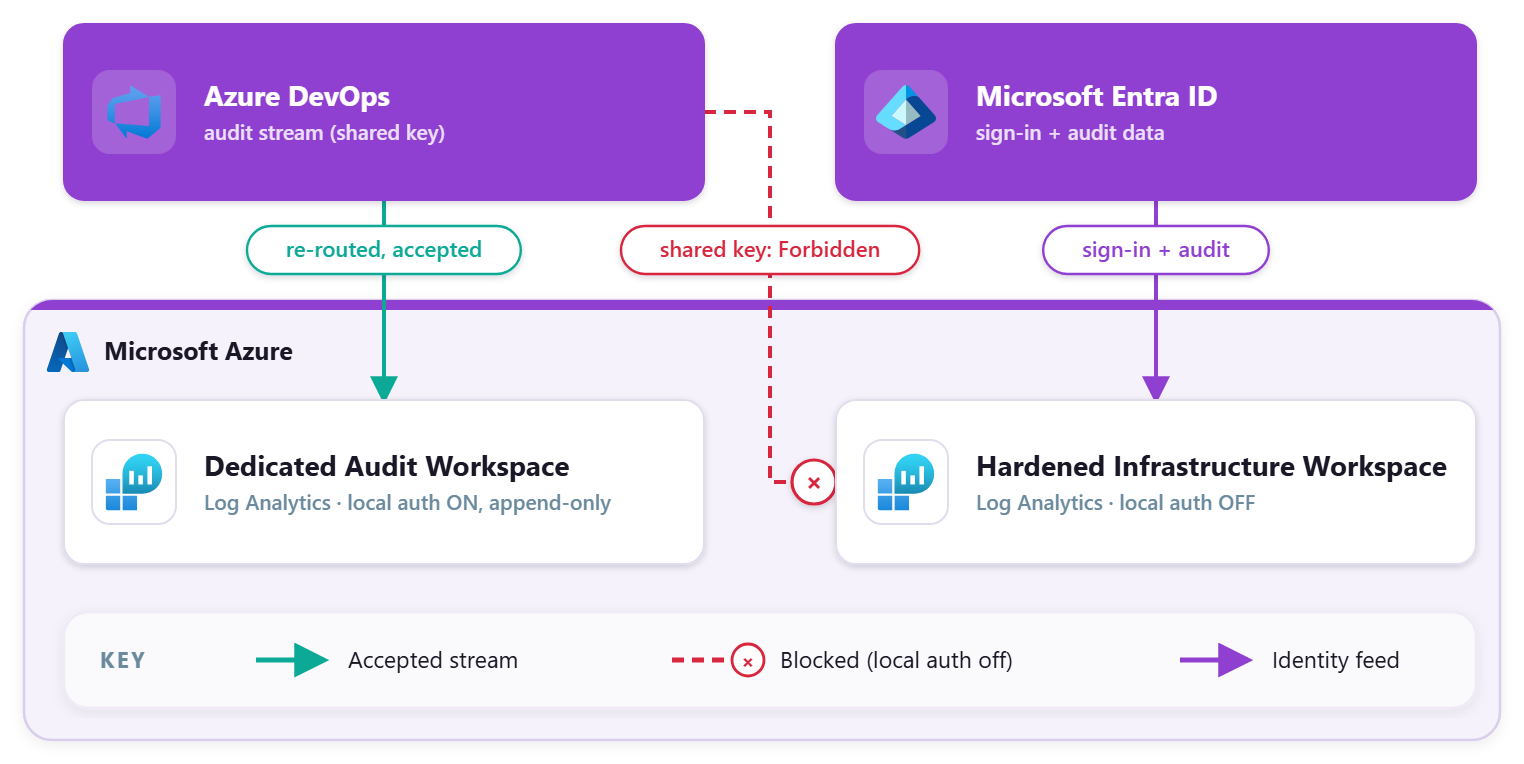
So I had a choice to make. Do I weaken my pre-existing LAW to allow Azure DevOps to stream it's data into it? No, not happening. So I just stood up a dedicated, minimal audit workspace with local auth enabled. In isolation, append-only to ensure if the shared-key ever made its way out into the wild, it could only really cause hassles within that specific workspace. Not ideal, but it does flip a red to green! :D
So, like a good egg, documented this in our Infrastructure documentation as an exception to my usual rule because having that audit data available is better than not, even if it's not against the best solution. Definitely a find worth calling out.
My First Public Pull Request Section titled My First Public Pull Request
One little tidbit of fun was as part of this remediation flow we surfaced some potential improvements to the Maester suite. This was a good opportunity for me to actually dip my toes into the big scary world of open-source contributions so figured why the hell not! Nothing fancy or crazy, just a few gotchas that were discovered where certain checks would error where they should have skipped due to licensing. Maester already includes a license-aware skip system so these were just teeny tiny fixes to include that logic.
| Pull Request | Maester Test | Description |
|---|---|---|
| #1844 fix: CIS.M365.4.1 skip when tenant is not licensed for Intune | CIS.M365.4.1 | Merged. Added a Get-MtLicenseInformation -Product Intune pre-check so the device-compliance check skips as NotLicensedIntune instead of erroring on a tenant without Intune. Aka me currently. |
| #1846 fix: skip ZAP test when Defender for Office 365 is unlicensed | CIS.M365.2.4.4 | Merged. Same licence-aware pattern for the zero-hour auto purge (ZAP) check; skips as NotLicensedMdo when Defender for Office 365 is not present. |
| #1845 fix: SPF lookups fail on null DNS server (CISA.MS.EXO.2.1/2.2) | CISA.MS.EXO.2.1, CISA.MS.EXO.2.2 | Closed as a duplicate. Proposed guarding the SPF resolver against a null DNS server. A pre-existing PR was already in flight, so it was superseded. |
All-in-all I'd say a pretty successful first!
Wiring the Score to the Website Section titled Wiring the Score to the Website
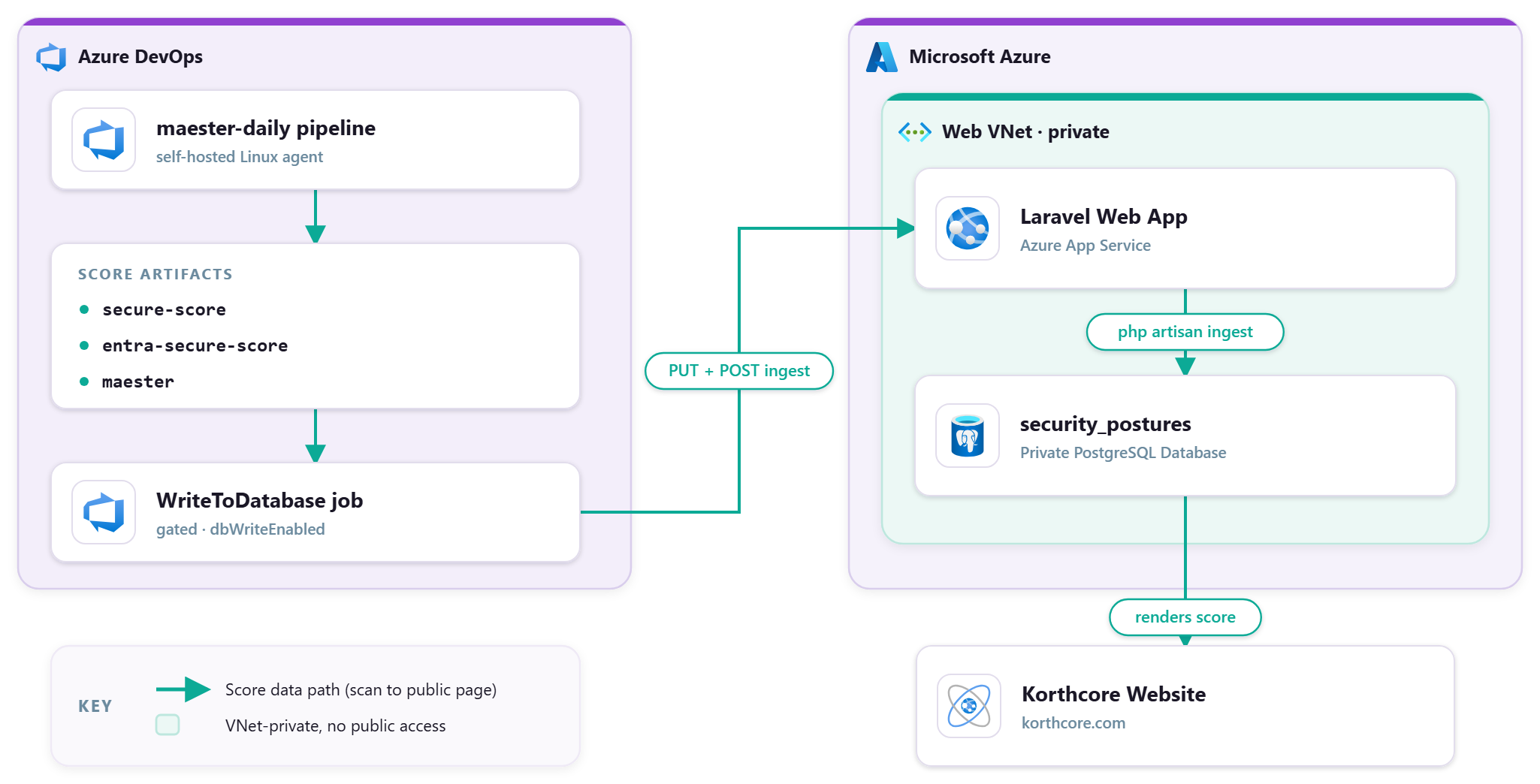
For a fun silly little side aspect of integrating Maester across the domain was that I wanted to publicly show that score on our front page. Same PostgreSQL database the blog uses, same one-way trust boundary with the DB itself on a Private VNet where Public Access is disabled intentionally. To be absolutely clear, this is and was wholly unecessary, I just figured it'd be fun to do 'cause why not. Arguably could be seen as a negative posting security posture publicly, but I also think it's a bit of good fun in this instance.
The Pipeline: Scan to JSON to Endpoint to Database Section titled The Pipeline: Scan to JSON to Endpoint to Database
So the database holds literally nothing special, no user data or PII, it's pure blog. That doesn't mean I wasn't ensuring it wasn't locked the hell down though, with only the Laravel Web App itself (the App Service) able to access the PostgreSQL Server due to being in the same VNet. So not my pipelines nor my PC itself can reach the database directly. By design.
So how did I get this data ingested? Shenanigans, that's how. I have my maester-daily.yml pipeline running this bad boy and as part of the run I have it extract out three small JSON artifacts:
- Microsoft Secure Score:
secure-score.json - Entra ID Secure Score:
entra-secure-score.json - Maester Summary:
maester.json
Nothing crazy, just a basic synopsis of score data in JSON format. Now, the actual needlessly complex nonsense. These files are then PUT to the App Service private disk using the Kudu virtual file system API then POSTs to an authenticated app endpoint. That endpoint then runs the appropriate php artisan command inside the app container itself, using the app's own database connection, then returns a POSTURE_INGEST_OK marker the pipeline validates against.
Still with me? Now, I have all my pipelines utilise Workload Identity Federation authentication, which allocates the service connection to my tenant. That service connection authenticates both those calls (PUT and POST), the web app validates the token's tenant, object and audience claims against the Service Principal and BAM instant data ingestion. Like I said, needlessly complex haha but fun! It is toggleable though, there's a little dbWriteEnabled flag in the pipeline to flick on or off. We love a good killswitch.
The Security Posture Data Shape Section titled The Security Posture Data Shape
This is more informational than anything else, just to see how I structured the shape of the data for use. Below is pretty much exactly what the Maester .json file outputs as. Four (4) integers. The Secure Score ones a touch more complex, but not by much, it's just the same structure the data returns from the Graph API endpoints.
{
  "passedTests": 156,
  "totalTests": 412,
  "failedTests": 90,
  "skippedTests": 166
}
The actual security_postures schema in the database is a bit of a different story, shaped to support each of the different data shapes. Table below is a rough shape, not exact (I've omitted id and timestamps for clarity).
| Column | Type | Role |
|---|---|---|
source |
string, unique |
the source key (secure_score, entra_secure_score, maester); the ON CONFLICT target |
label |
string |
display label for the score |
value |
string |
the headline figure shown on the page |
summary_data |
jsonb, nullable |
the full JSON breakdown (the payload above) |
synced_at |
timestamptz |
when the row was last refreshed |
Where it's Visible Section titled Where it's Visible
It's on the front page of korthcore.com right meow. The Entra Secure Score and Maester values in the silly system status panel is the live data. Or well, as live as the last sync timestamp indicates anyway. There's no raw data or anything, just a basic % calculation. Entra Secure Score shows as 100% and it's not inherently incorrect, it's just measuring exactly what's capable on the business basic licence, Maester just gives us the full picture at our 57%.
Seems a lot of effort for a single number no? Kind of! If you've read through the KXC Website Series you'd see I note this as a v1.0.0 version of the site, a v2.0.0 is being ideated, which includes a /security-posture page that I'll have dedicated to Maester and other related data! If you're reading this in the future, well I hope it turned out aight.
No Suppression Section titled No Suppression
As in the intro, I wasn't going to hide failures or not count them in my score eval. That does mean some checks will never pass so that 100% value wouldn't be achievable, but I'm fine with that, feels more truthful. We've got a current list of exceptions I keep track of to note what's a noted accepted failure (for now) and why. But only one there currently is permanently known.
| Check | Category | Why an Exception |
|---|---|---|
| CISA.MS.EXO.4.3 | Never applicable | Wants DMARC aggregate reports sent to a US government mailbox |
| ORCA.110 / 111 / 112 / 180 / 241 | Tooling false positive | The protections are live and correct on Business Basic. ORCA.111/112/180/241 are delivered by the always-on default anti-phish policy and the Standard and Strict presets (read-back confirms True) but ORCA cannot credit a policy whose Enabled reads null or a preset carrying a recipient condition. ORCA.110 reads a deprecated property no cmdlet or portal can set. Not cleared by any licence. Currently investigating cammurray/orca#124 |
| AZDO.1026 | Cost-gated | GitHub Advanced Security is a paid per-committer add-on, not a licence tier |
| MT.1074 | Upstream tooling bug | Test-MtLimitOnMicrosoftDomainUsage on Business Basic takes the no-Defender fallback, which enumerates Get-Mailbox and fails if any mailbox uses an .onmicrosoft.com primary address. Every real mailbox is on the custom domain and it annoyingly fails only on the built-in Discovery Search Mailbox, a Microsoft system mailbox permanently on .onmicrosoft.com that cannot be renamed as far as I'm aware. Defender XDR Resolves this. maester365/maester#1840 |
Definitely not sending my DMARC reports to a US Gov Mailbox lol. And the paid GitHub one can stay failing a while.
The ORCA one is interesting, I've been lazy in going back to dig into it, but for now I'm letting it fail. Similarly, I did an initial dive into the .onmicrosoft.com and raised an issue, but I've been meaning to go back and raise a PR fix as it's not dissimilar from the previous licensing related ones.
Maxed out on Business Basic Section titled Maxed out on Business Basic
Honestly? Barebones Business Basic or not, there's actually a solid set of security enhancements to enable out the gate without any significant licensing cost involved. Sure, it's not hectic Enterprise Grade security, but it's a fairly significant chunk of coverage for most smaller sized tenancies. The Exchange Online protections are pretty solid starters, the Entra ID auth methods, Azure DevOps enforcements, Teams and SharePoint. All solid coverage across the stack.
But, and there's always a but. 57% is still a very telling number. It's not great. And digging through all those failures and skips told us pretty clearly most every remaining red was sitting behind a license gate. But, as we're chasing those gains that gave us a great little roadmap on what's required to uplift our score even higher.
| Remaining Gap | Unlocks With |
|---|---|
| PIM, Identity Protection, privileged access reviews (the biggest single unlock) | Entra ID P2 |
| Conditional Access policies, dynamic groups | Entra ID P1 |
| Device compliance marking | Intune Plan 1 |
| Safe Links, Safe Attachments, impersonation protection, Teams ZAP | Defender for Office 365 P1 |
All that info gathering netted me a new document,
licensing-upgrade-path, as some solid guidance on what licensing is available to cover the remaining Maester tests, broken down into the cheap path as individual licences as add-ons with a focus on licensing for these security features only (i.e. not necessarily Application access etc). And the typical Enterprise path, which look we all know is basically "Purchase an E5 or E7 licence and you're set!".
But that's the first part of this journey done! Whilst I could step straight up to P2, I'm going to intentionally go baby steps so I can document and remediate at every level. So next up is likely gonna be a P1!
Post Series :: Maester - From Zero to Hero
A Korthcore journey from a fresh(ish) Microsoft tenant to a hardened, high-scoring security posture using Maester (and others) as the TDD push to enterprise level security no matter the size. Documented in full (including remediation automations) stepping through the licence gates one at a time.
| # | Post |
|---|---|
| Part 1 | Maester - From Zero to Hero |
| Do it once, do it right. Wiring Maester as a Red to Green Test Driven Development experiment with secure foundations on a greenfield tenant. | |
| Part 2 | Maxing Out Business Basic // you are here |
| We've got our baseline, Microsoft Business Basic licensing. The idea being to squeeze everything this baseline licensing allows out of our Maester score, remediating the tenant control by control, and documenting the lot. | |